
Write excel sheets with Python without a specific package

I am writing from my own experience of trying to write excel sheets using Python. I work mostly on IOT projects and more often than not, I need to either scrape some data or log some data. This hack comes from Ajith's brainchild. I approached him with a question, some 3 months ago when I was saving data from an API and I had to make sure it was in the form of an excel spreadsheet.
First google query I fetched me the following links: Automate boring stuff, Python-excel and a few others. The problem here was, I needed to go through another package's documentation and find out how it works before actually using it. Here comes Ajith's hack. He asked me why don't you write a .txt file which has all that you want, but all the data separated by restricting elements? Obviously I did not get the question in the first place. So he showed it to me.

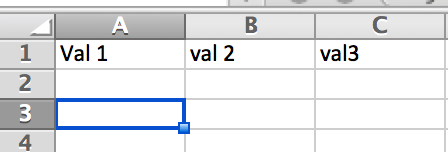
Let's see, maybe you need to write a excel sheet which looks like this. What you need to do in this case is is initiate a python script which opens a finalFile.txt in wb mode. The next line will be used to give the column head names. Now the file has been initiated. The next thing is writing content to it.

You will realize that above line is basically similar to the earlier section. The difference here is all the above values will be written in the next line. All you have to do now is open the .txt file as an excel file. And that is how you make you work easier faster and less painful! Suggestions? Questions? Feel free to ask!

Member discussion